
Best SSH Clients for Mac: OpenSSH, Termius, and Rumus Compared
Choose a Mac SSH client by comparing how OpenSSH, Termius, and Rumus handle separate keys, a bastion host, and an SFTP upload.
If you already know the host you want to reach and spend most of the session at a shell prompt, start with OpenSSH in Terminal. Your Mac already has the tools to save a host alias, connect through a bastion, and upload files. A separate app earns its place when choosing the right host or moving files is a substantial part of the job. Apple Terminal User Guide
| Choose | When it fits your work | What to weigh |
|---|---|---|
| OpenSSH in Terminal | Scripts and interactive sessions should use the same host names, keys, and routes. | You maintain a text config and transfer files at an sftp prompt. |
| Termius | You want a saved host list on your Mac and phone when you’re on call. | Starter keeps a local vault. Sync across devices requires a paid plan. |
| Rumus | You regularly work in a remote shell and browse files on that same host. | SSH, SFTP, and a local vault are free. Cloud sync for settings and vault data is in Pro. |
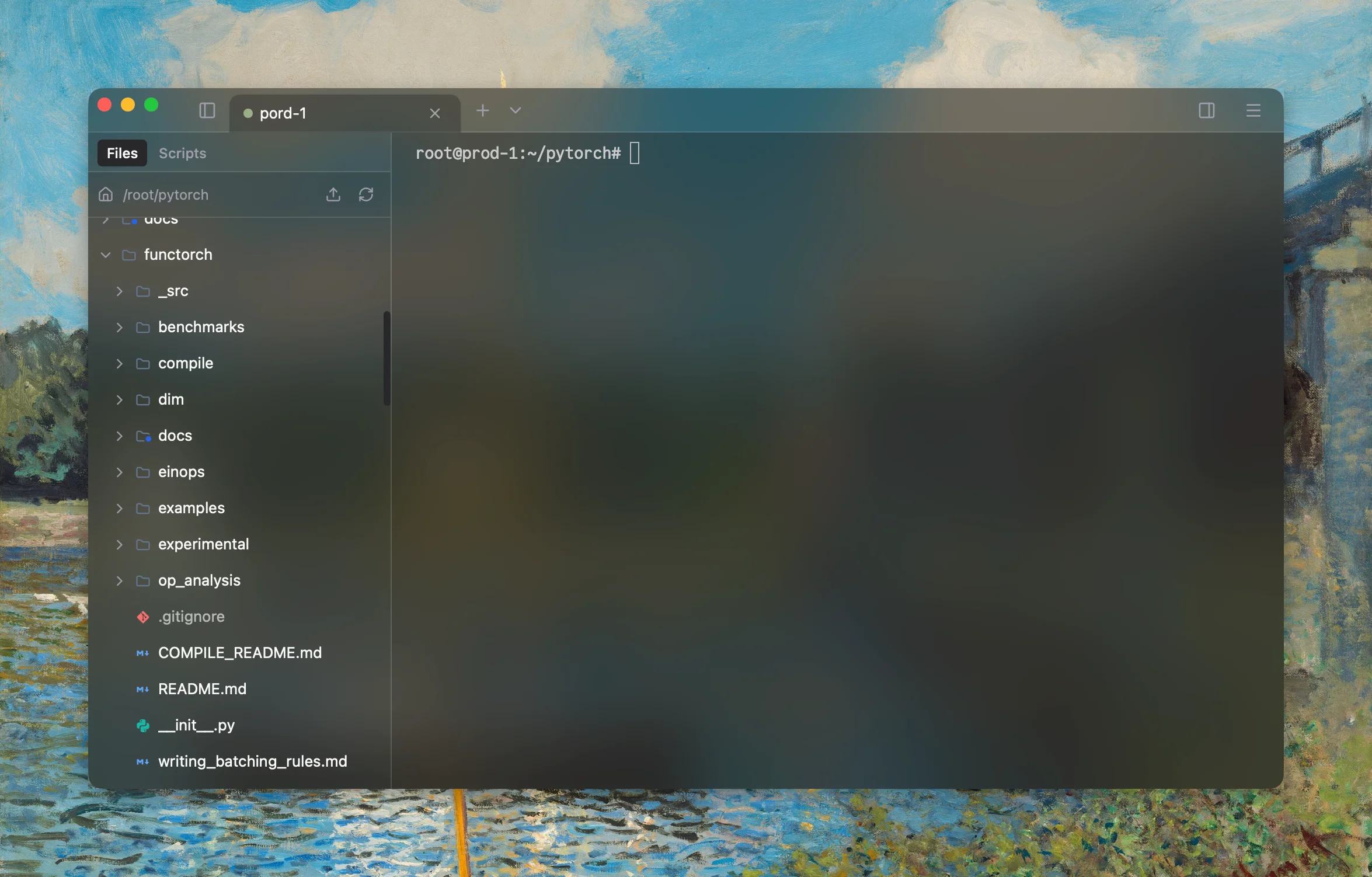
Here’s how the three handle the same job. You have an ops account on a gateway, a deploy account on a private app server, and a different key for each. You need to reach the app through the gateway and upload one file to your remote home directory. We checked the OpenSSH configuration with ssh -G on Linux. The Mac app workflows below follow the vendors’ documentation, and the screenshot shows the Rumus interface. Plan details were checked on November 22, 2026. Termius plan comparison · Rumus plans
Save two hosts with different keys
OpenSSH. Put the following entries in ~/.ssh/config on your Mac, substituting your hostnames, users, and key paths. The two aliases will work in both ssh and sftp. With IdentitiesOnly yes, the client uses the configured identities even if your agent holds several other keys.
Host ops-gateway
    HostName gateway.example.net
    User ops
    IdentityFile ~/.ssh/gateway_ed25519
    IdentitiesOnly yes

Host ops-app
    HostName app.internal.example
    User deploy
    IdentityFile ~/.ssh/app_ed25519
    IdentitiesOnly yes
    ProxyJump ops-gateway
Termius. Save the gateway and the app as two Hosts. In the Keychain, you can pair a username and key as a named identity. Assign the ops identity to the gateway and the deploy identity to the app. Termius identities
Rumus. Under Settings → Vaults → Hosts, create one record for each machine. Assign the ops credential to the gateway and the deploy credential to the app. Saving the gateway as its own host also lets you reuse it for another private server. Rumus host management
Reach the private host through the gateway
With OpenSSH, ssh ops-app uses the ProxyJump line above. Before connecting, you can inspect what each alias resolves to. Check both: the destination’s username and key do not set the gateway’s credentials. OpenSSH client configuration
ssh -G ops-gateway | grep -E '^(hostname|user|identityfile) '
ssh -G ops-app | grep -E '^(hostname|user|identityfile|proxyjump) '
In Termius, edit the app host and select the saved gateway in its host chain. Open the app host to start the session. Termius lists jump hosts in the free Starter plan, so this route alone doesn’t require an upgrade. Termius feature comparison
In Rumus, open the app host’s settings, add the gateway under Host Chaining, then connect to the app. For a single jump, the chain contains just the gateway. On the first connection, check each new host fingerprint against one provided by its administrator. Rumus jump host guide
Upload a file and check where it landed
Suppose release-notes.txt is in your local Downloads folder. With OpenSSH, open Terminal and run:
cd ~/Downloads
sftp ops-app
At the sftp> prompt, run these four commands. lpwd shows the local source directory and pwd shows the remote destination. Check both before the transfer. The final listing confirms the file is on the app server. OpenSSH SFTP manual
lpwd
pwd
put release-notes.txt
ls -l release-notes.txt
In Termius, use the macOS app from the Termius website for this upload. The Mac App Store version has limited access to local folders. Open SFTP for the saved app host, show Downloads in one pane and the remote home directory in the other, and drag the file across. Check its name and size in the remote listing. Termius SFTP guide and screenshots
In Rumus, open the Files pane in the app’s SSH session. Navigate to your remote home directory and drag the file from Finder into the remote tree. The shell stays visible beside it, so you can also run ls -l ~/release-notes.txt there. Rumus SFTP guide
Questions before switching clients
Can I bring my existing SSH aliases into Termius? Yes. If you want to import the keys referenced by IdentityFile, use the macOS app downloaded from the Termius website. From the Hosts screen, choose New Host → Import, select ~/.ssh, and review the entries. Try connecting to one private host with its imported key and gateway before importing the rest. Termius import guide
Do I need to copy my app key to the gateway? No. With the OpenSSH configuration above, the client on your Mac authenticates to each host. Keep both private keys on the Mac. Agent forwarding is unnecessary for this connection. OpenSSH client configuration
What if I need to download a whole directory? At the OpenSSH sftp> prompt, get -R reports copies the remote reports directory recursively. The Rumus file browser supports individual file downloads. Its guide recommends rsync or downloading an archive for a whole tree. OpenSSH SFTP manual · Rumus SFTP guide
For scripted connections, keep the OpenSSH aliases. If you need those same saved hosts on your phone, Termius offers that sync. If you want the remote shell in view while you move files, try the same upload in Rumus with one of your own hosts. Rumus for macOS
Open the server in Rumus and let the AI agent inspect context, propose a plan, and ask before it runs changes.