> ## Documentation Index
> Fetch the complete documentation index at: https://www.rumus.ai/docs/llms.txt
> Use this file to discover all available pages before exploring further.
# Introduction
> Rumus is an AI-native terminal that reimagines how developers work with servers.
 ## What is Rumus?
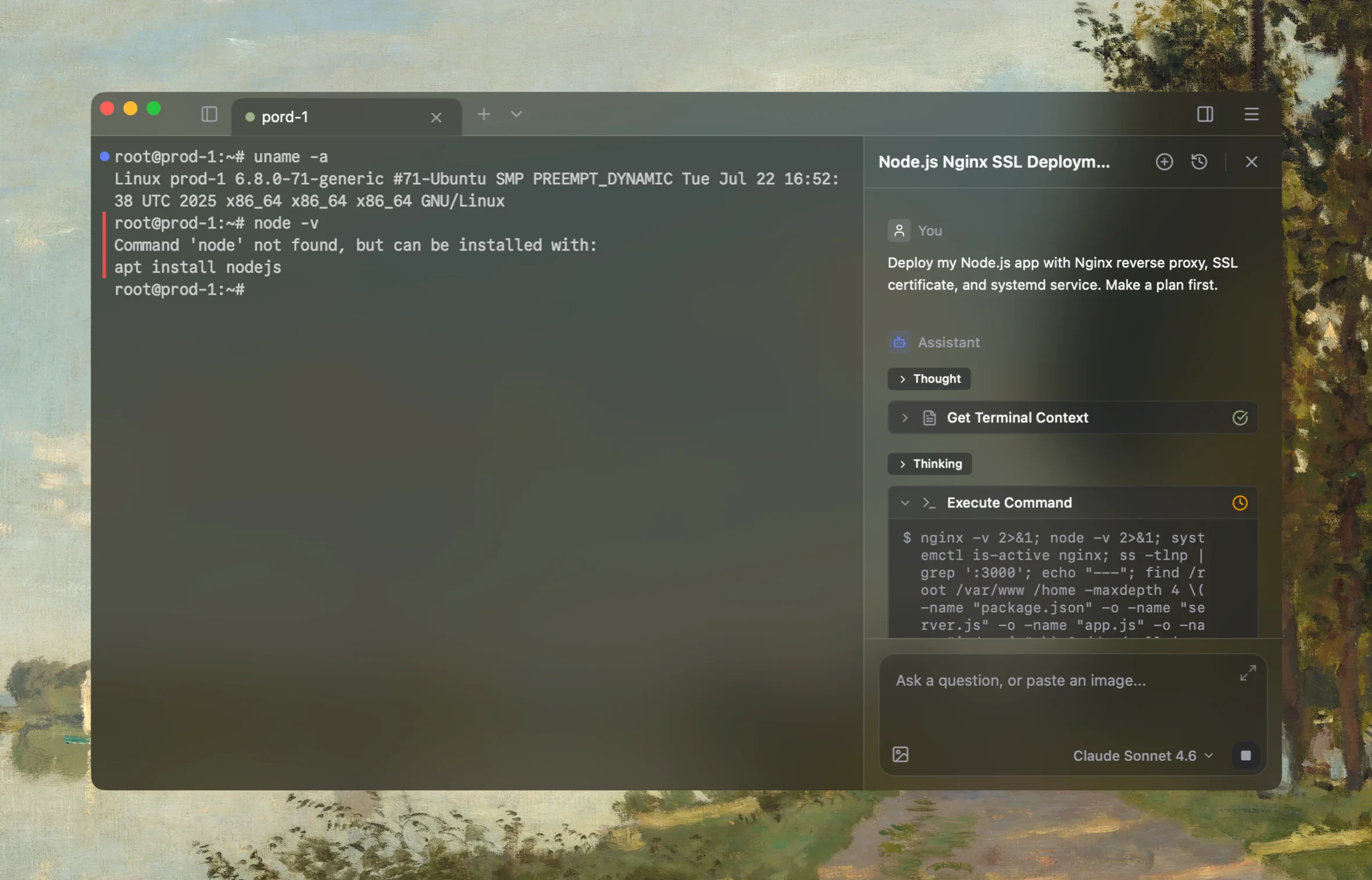
**Rumus** is an AI-native terminal built for developers who live on servers. It brings a modern terminal, agentic AI, and infrastructure management together in a single workspace — so you can automate commands, connect to any host, and ship complex tasks without juggling a dozen tools.
> **One terminal. Everything you need.**
Whether you are deploying a service, debugging a remote box, or running multi-step ops across a fleet of machines, Rumus keeps everything — your sessions, your files, your AI — in one place.
## Key Features
### AI & Automation
Context-aware completions that learn from your workflow and anticipate the next command.
Let the agent read files, run commands, and search the web to complete tasks end-to-end.
Break complex jobs into reviewable steps before anything is executed.
Fan out work to parallel agents and bring the results back into one thread.
Teach Rumus your conventions once and reuse them across every session.
Connect your own tools and APIs through the Model Context Protocol.
### Infrastructure Management
Save, organize, and connect to hosts — with credentials encrypted end-to-end on your device.
Browse, upload, and drag-and-drop files between local and remote, right next to your shell.
Traverse bastions and private networks with multi-hop connections that just work.
HTTP, HTTPS, and SOCKS5 proxies built in for restricted network environments.
Watch CPU, memory, disk, and GPU on every host without leaving your terminal.
18 curated color schemes and full customization to make the terminal yours.
### Workspace
Lay out multiple terminals, monitors, and notes on a zoomable canvas inside a workspace — perfect for project-shaped work.
Type once, run everywhere. Send the same command to many sessions at once.
GPU-rendered output stays smooth even with heavy logs and large scrollback.
Your keys and secrets are encrypted on-device. The server only ever sees ciphertext.
## Available Everywhere
Rumus runs on the platforms you already use.
Apple Silicon & Intel
x64 & ARM64
AppImage, .deb, .rpm
## Next Steps
Install Rumus and connect your first host.
How end-to-end encryption keeps your vault private — even from us.
Get the latest build for your OS.
Share ideas, get help, and connect with other Rumus users.
## What is Rumus?
**Rumus** is an AI-native terminal built for developers who live on servers. It brings a modern terminal, agentic AI, and infrastructure management together in a single workspace — so you can automate commands, connect to any host, and ship complex tasks without juggling a dozen tools.
> **One terminal. Everything you need.**
Whether you are deploying a service, debugging a remote box, or running multi-step ops across a fleet of machines, Rumus keeps everything — your sessions, your files, your AI — in one place.
## Key Features
### AI & Automation
Context-aware completions that learn from your workflow and anticipate the next command.
Let the agent read files, run commands, and search the web to complete tasks end-to-end.
Break complex jobs into reviewable steps before anything is executed.
Fan out work to parallel agents and bring the results back into one thread.
Teach Rumus your conventions once and reuse them across every session.
Connect your own tools and APIs through the Model Context Protocol.
### Infrastructure Management
Save, organize, and connect to hosts — with credentials encrypted end-to-end on your device.
Browse, upload, and drag-and-drop files between local and remote, right next to your shell.
Traverse bastions and private networks with multi-hop connections that just work.
HTTP, HTTPS, and SOCKS5 proxies built in for restricted network environments.
Watch CPU, memory, disk, and GPU on every host without leaving your terminal.
18 curated color schemes and full customization to make the terminal yours.
### Workspace
Lay out multiple terminals, monitors, and notes on a zoomable canvas inside a workspace — perfect for project-shaped work.
Type once, run everywhere. Send the same command to many sessions at once.
GPU-rendered output stays smooth even with heavy logs and large scrollback.
Your keys and secrets are encrypted on-device. The server only ever sees ciphertext.
## Available Everywhere
Rumus runs on the platforms you already use.
Apple Silicon & Intel
x64 & ARM64
AppImage, .deb, .rpm
## Next Steps
Install Rumus and connect your first host.
How end-to-end encryption keeps your vault private — even from us.
Get the latest build for your OS.
Share ideas, get help, and connect with other Rumus users.